


Monthly
€3.99 /month
7 days free, then €3.99/month. Renews monthly until cancelled.
- A payment method is required to start the trial.
- Activate on two personal installations.
Focus timer for macOS
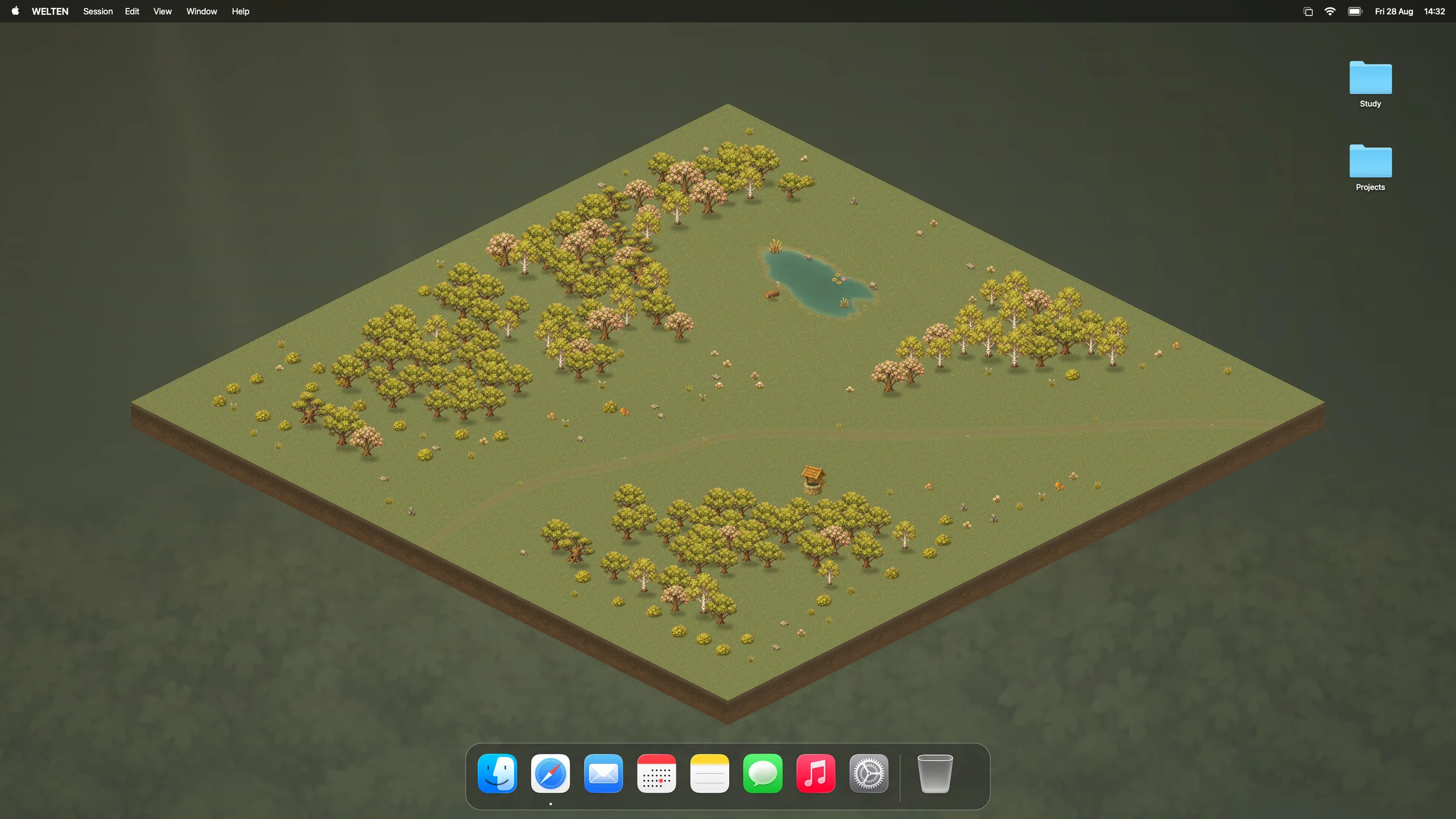
A Mac focus timer that grows a forest behind your desktop icons. Every session you finish plants a tree that stays.
Plant your first tree free · macOS 14+ · Apple Silicon

Inside WELTEN
Scroll through it, or jump straight to what you want to see.
Demo · 48 seconds
A 25-minute focus session as a time-lapse: pick a to-do from Apple Reminders in the menu bar, watch a tree grow behind your desktop icons while Wurzel keeps you company, then tick the to-do off.
Menu bar timer
Click the tree in your menu bar to choose focus time, project and routine. While a session runs, the same panel shows the time left and the growing tree. No window to keep open.
Quick Focus · ⌥⌘F
Press ⌥⌘F in any app. The same timer opens right where you are working, and gets out of the way as soon as your session starts.
Routines
A quick 10 minutes or a longer stretch. Set focus from 1 to 180 minutes and save routines with breaks and rounds you can reuse.
Focus sounds
Choose Forest, white, pink or brown noise, or play your own music from Spotify or YouTube. The sound follows your timer, and your volume is remembered for each audio output.
Desktop forest
Your Waldlichtung forest lives in its own layer below your icons. Your Mac wallpaper stays exactly as you set it.
How it grows
Every tree keeps growing across later sessions. Pick a count to watch the clearing fill in.
Tree families
Oak, Birch, Sakura, Ginkgo, Ume, Momiji and Sugi. Give each project its own tree family and see at a glance where your time went.
Chapters
After 500 finished sessions your forest moves to your archive and a new one begins.
Today
Finished sessions, focus time and what grew today, in one calm view.
Focus time
Your focus time across days and projects. All of it stays on your Mac.
Projects
Give every session a project and see how each one shapes your forest.
Apple Reminders
Connect your Reminders lists and pick a task when you start. It stays linked to the session, and you can mark it complete right from the timer.
Mac Focus automation
When a session starts, WELTEN switches your Mac into Do Not Disturb or any Focus you choose, and turns it off again when you pause, take a break or finish.
Wurzel companion
An optional companion on your desktop. Wurzel shows the time left, lets you pause, cheers when a tree is planted and opens Quick Focus with one click. Drag it wherever you like.
Stop a session early or take a few days off. Nothing withers, and there are no streaks to lose.
Your sessions, projects and forest stay on your Mac. No WELTEN account required.
WELTEN draws in its own layer below your desktop icons. Your Mac wallpaper stays exactly as you set it.
Pricing
Plant your first tree free: a short guided session during setup shows how WELTEN works. When you’re ready for more, choose a one-time purchase or start the monthly plan with a 7-day free trial. Both options include the same features and the Waldlichtung forest world.
€3.99 /month
7 days free, then €3.99/month. Renews monthly until cancelled.
€24.99 once
Keep using WELTEN and the Waldlichtung forest world, including all published 1.x updates.
Euro prices include applicable tax. Choose your plan inside WELTEN. Installing the app does not start a subscription. Sales and licence terms.
Anything else?
hello@welten.app ↗
No. Your wallpaper stays exactly as you set it. WELTEN draws in its own layer below your desktop icons.
Yes. Choose 1 to 180 minutes, or save named routines with focus time, break length and number of rounds.
Choose Forest, white, pink or brown noise, or your own music from Spotify or YouTube. Add a gentle chime every 5, 10 or 15 minutes, or keep your sessions silent.
When nothing is growing, the forest redraws about once a second. A lower-performance mode and Reduce Motion support keep it lighter still.
Yes. Show your forest on your main display or on all displays.
An Apple Silicon Mac with macOS 14 or later. Intel Macs are not supported.
Plant your first tree free. Then choose €24.99 once, or 7 days free followed by €3.99/month. Prices include applicable tax.
Download WELTEN for your Mac and plant your first tree free: a short guided session during setup shows how it works. Choose a plan in the app when you are ready.
WELTEN for Mac
Both plans include the Waldlichtung forest world and two personal installations. A one-time purchase includes published 1.x updates.
Download for MacAlready a private-beta tester? Restore your personal beta code in the app to keep your promised free access and one-time discount. Beta terms.


